

DHH recently posted the following in an issue titled Add basic authentication generator.
Rails now include all the key building blocks needed to do basic authentication, but many new developers are still uncertain of how to put them together, so they end up leaning on all-in-one gems that hide the mechanics.
To address this, Rails 8 has introduced a generator that simplifies the addition of basic authentication to Rails applications. In this blog post, we'll explore the components included in this authentication scaffold.
Adding authentication to your Rails application
To set up a basic authentication system in your Rails application, execute the following code.
bin/rails generate authentication
This command generates a set of essential files that provide a foundational start for implementing authentication, including support for database-tracked sessions and password reset functionality. Here is the gist of the generated scaffold.
Let’s examine the components created by the authentication generator.
Models & migrations
To lay the groundwork for handling user accounts and session management, the
models
User,
Current
and
Session
are set up along with their corresponding migrations. This setup includes:
-
CreateUsersmigration: It creates auserstable, with a uniquely indexedemail_addressfield andpassword_digestfor storing the securely hashed passwords usinghas_secure_password. -
CreateSessionsmigration: It sets up thesessionstable, which includes a uniquetokenfield, along withip_addressanduser_agentfields to record the user's device and network details. TheSessionmodel useshas_secure_tokento generate unique session tokens. -
The
Currentmodel manages per-request state and provides access to the current user's information through a delegatedusermethod. -
Additionally, the bcrypt gem is added to the Gemfile. If this gem is not present, it is added; if it is commented, it is uncommented, and then
bundle installis run to install the gem.
Authentication concern
The core authentication logic and session management are encapsulated in the
Authentication
concern.
-
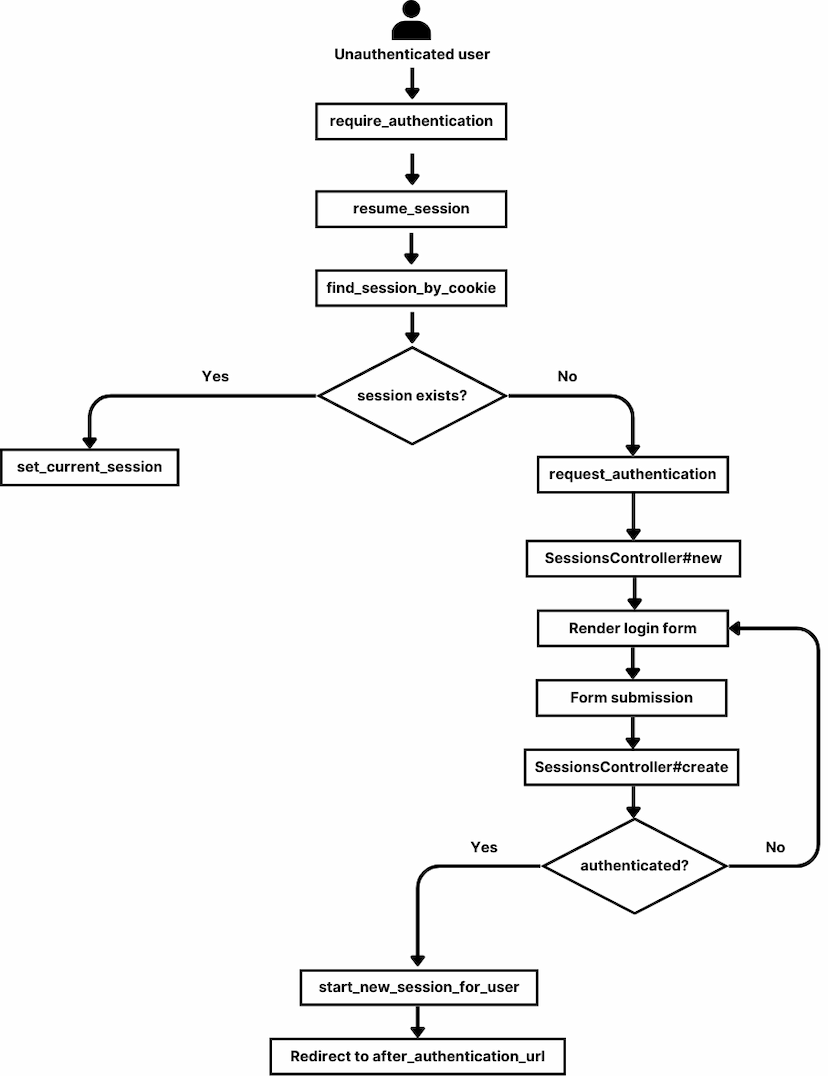
require_authentication: This is abefore_actioncallback which attempts to restore an existing session withresume_session. If no session is found, it redirects the user to the login page usingrequest_authentication. -
resume_session: Retrieves a session using a signed token from the cookie via thefind_session_by_cookiemethod. Sets it as the current session, and saves the token in a permanent, HTTP-only cookie using theset_current_sessionmethod. -
authenticated?: A helper method that checks if the current user has an active session. -
allow_unauthenticated_access: This class method allows specific actions to bypass therequire_authenticationcallback. -
after_authentication_url: Returns the URL to redirect to after authentication. -
start_new_session_for(user): Creates a new session for the given user with details of the user's device and IP address and then sets the current session. -
terminate_session: Destroys the current session and removes the session token from cookies.
Managing sessions
The
SessionsController
handles user session management and includes the following actions:
-
new: Renders a login form for the user credentials. Thenew.html.erbfile includes fields for email and password, displays flash messages for success and errors, and provides a link for password recovery. -
create: Authenticates the user with the provided credentials. On success, it creates a new session and redirects to theafter_authentication_url; on failure, it redirects to the login form with an error message. -
destroy: Terminates the user’s session and redirects to the login form.
Combining all of this, a basic authentication flow would look like this.
Password reset functionality
The basic password reset functionality includes initiating a password reset
request, dispatching reset instructions via email, and updating the password.
The
PasswordsController
manages these actions as follows:
-
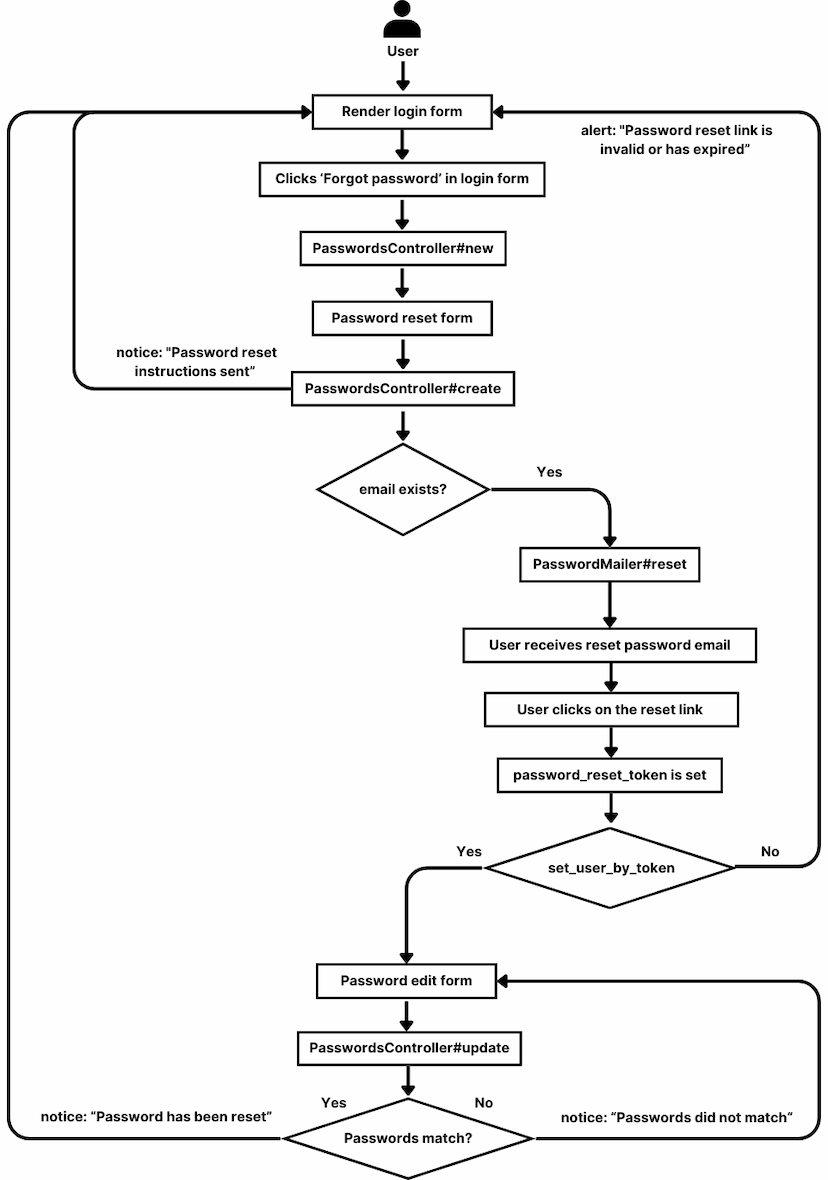
new: Displays the form to request a password reset using thenew.html.erbtemplate. -
create: Handles the reset request, sends a reset email via thePasswordMailerif the user exists, and redirects with a notice. This email contains a link to the password reset page, which includes apassword_reset_tokenas a parameter. Thepassword_reset_tokenis part of the newly added configuration tohas_secure_password. It has a default expiration period of 15 minutes. -
edit: Renders theedit.html.erbtemplate to set a new password. -
update: Updates the user's password, redirects on success, or shows an alert on failure. -
set_user_by_token: It is thebefore_actioncallback for theeditandupdateactions which retrieve the user based on thepassword_reset_tokenprovided in the request parameters, ensuring proper identification of the user.Putting these together, the flow of resetting the password would be as follows:
Current limitations and considerations
The current authentication generator supports email-password login for existing users but does not handle new account creation. Future updates may incorporate user account creation and other customizations.
Please check out the following pull requests for more details: